
Thinking about using Leadpages for your landing page campaigns?
Leadpages has been a popular landing page builder for years, especially among small businesses and solopreneurs who want a simple way to launch pages without coding.
However, as marketing tools evolve, many users are increasingly seeking alternatives that offer greater flexibility, automation, and advanced lead-generation features.
To see how well Leadpages holds up in 2026, we tested the platform firsthand by creating a sample lead-generation landing page in the builder. We explored the template library, drag-and-drop editor, lead-capture tools, and the overall workflow.
We then compared that experience with LanderLab, a newer AI landing page builder with advanced lead capture and faster campaign deployment.
In this guide, we break down:
- How Leadpages works in practice
- Its main strengths and limitations
- and whether LanderLab is a better Leadpages alternative for marketers running modern lead generation campaigns.
Leadpages vs LanderLab: Platform Comparison
To get a quick overview of how Leadpages compares to LanderLab, here is a side-by-side breakdown of the most important features.
| Feature | Leadpages | LanderLab |
| Ratings | Trustpilot: 3.4/5Product Hunt: 5/5 | Trustpilot: 4.2/5Product Hunt: 5/5 |
| What Can Be Built | Landing pagesWebsitesBlog postsMobile pages | Landing pagesWebsitesMobile pagesMicrositesThank you pages |
| Number of Templates | 200+ Landing Page templates50+ Website Templates | 100+ Landing Page templatesIndustry-specific categoriesSpecial templates for affiliate marketing and lead generation |
| Integrations | 90+ integrationsAdditional via Zapier | CRM integrationTracking integrationNative integration with spy toolsTraffic FilteringCloudflare Additional via ZapierCustom Webhooks |
| Interactive Forms | Basic forms only No multi-step capabilities No conditional logic |
✓ Quiz funnels ✓ Conditional logic |
| AI Features | ✓ YesAI copywritingAI image generation
|
✓ YesAI landing page builder AI quizz maker AI copywriting AI translation AI image tools |
| Page Localization | ✗ No | ✓ YesAI-powered translationMulti-language support |
| Optimization Features | A/B testing (Pro and Conversion plan only)Leadmeter scoringReal-time analyticsExpert feedback | A/B/x testing (Growth Plan and above)Advanced analyticsClick trackingConversion trackingDynamic text and image replacementTracking integrationExpert feedback and customization |
| Unique Additional Features | Blog platformCountdown timersOpenTable widgetCalendly integration | Webhooks connectionURL importationZIP file uploadsSpy tool integrationDownloadable landing pagesLanding page cleaning serviceCustom code editorFile management systemPage customization serviceAdvanced traffic distribution AI landing page creator AI quiz maker |
What is Leadpages?
Leadpages is a landing page builder designed to help businesses create marketing pages without coding. Founded in 2012 and headquartered in Minnesota, the platform has grown from a simple landing page tool into a broader marketing solution aimed primarily at small businesses and entrepreneurs.
Today, Leadpages allows users to create landing pages, simple websites, pop-up forms, and alert bars using a drag-and-drop visual builder.
Users typically start by choosing from a library of pre-designed templates and then customizing each section manually inside the editor. The platform focuses on making page creation accessible for users without technical experience.
Leadpages positions itself as an all-in-one tool for building pages, capturing leads, and launching campaigns quickly. The question is whether it still holds up against newer landing page platforms in 2026.
If you’re exploring different types of lead generation tools, it’s also worth looking at platforms like HeyFlow alternatives for interactive funnels or GoHighLevel alternatives for all-in-one CRM and automation workflows.
Why People Use Leadpages
Leadpages is commonly used by small businesses and independent marketers who want to launch landing pages quickly without dealing with code or complex tools.
Typical users include business coaches, real estate agents, consultants, local service providers, and small online businesses.
Some of the reasons users choose Leadpages include:
- Landing pages can be created quickly using pre-built templates
- The drag-and-drop builder makes editing simple for non-technical users
- Built-in lead capture tools like pop-ups and alert bars
- Integration with popular marketing platforms such as Mailchimp and ActiveCampaign
- Unlimited traffic and leads on most plans
Leadpages also includes features designed to help improve conversions, such as Leadmeter, a scoring system that evaluates landing pages and suggests improvements based on general conversion best practices.
However, while Leadpages promotes AI capabilities, these are mostly limited to basic content assistance like generating text or images, rather than generating complete landing pages automatically.
The Leadpages set up is relatively easy to navigate. Creating various landing pages is not time consuming nor complicated and if ever there arise an issue their customer service team is swift with assisting us to get the results that we need, even on weekends. We’re truly glad we choose leadpages to host our website and landing pages. Now, if they add an email integratio,n that would be superb.”
ReRa of reramagiciam.com, Verified User Review from TrustPilot
What are Leadpages Disadvantages?
Leadpages’ most significant drawback surfaces quickly once users start customizing templates. The page builder only allows elements to be placed in predetermined positions, severely limiting creative freedom.
While over 70% of user reviews remain positive, several key limitations consistently appear in user feedback:
- The standard plan limits you to just 5 landing pages, forcing upgrades for basic scaling needs.
- A/B testing is locked behind the Pro plan, making optimization difficult for new users.
- Limited form customization with no option for multi-step forms, quiz funnels, or conditional logic.
- No way to import existing landing pages or competitor pages for inspiration,
- Limited form customization with no option for multi-step or conditional logic forms,
- Basic integrations require Zapier for tasks that competitors handle natively.
While Leadpages continues to satisfy most users’ basic landing page needs, not enough notice for plan changes is a particular pain point for growing businesses.
Once you go over the maximum of 5 landing pages for the Standard Plan, they will automatically upgrade you to the Pro plan. Even when you unpublish live pages to make sure you only have a max of 5 live pages, it will not automatically revert you back to the lower tier plan.
“They raised rates by 100% and gave only 14 days notice. I enquired immediately how to keep $49/month price and they informed me I needed to have 5 LPs live – which I did immediately, I unpublished. Now doing my expenses, I see despite that they charged me the new price $99/month. Why does support chat exist if they don’t do their job? I unpublished the pages and had 5 so why did you still charge me double? I am angry and awaiting my refund. If I don’t get I will ask chargeback from my bank. I have all the proofs so this is stealing. Not even heard ‘sorry’ on the chat and the nerve to say ‘refund is not guaranteed’ – I have no words. It’s your mistake.”
- Weronika Sz, Verified User Review from TrustPilot
Looking for a better Leadpages alternative?
Try LanderLab to build high-converting pages, import from URL, and A/B test your ideas faster than ever.
Leadpages Key Features
Landing Page Builder
The drag-and-drop builder has more than 200 templates that work well on mobile devices. Users can change their pages using the visual editor. They can click on any element to change what it says, how it looks, or its settings.
The builder includes widgets (prebuilt components) for common elements. These include countdown timers, forms, videos, and social buttons. Users can add these with just one click.
The platform also makes sure pages look good on different devices. They let users check how their pages will appear on phones, tablets, and computers.
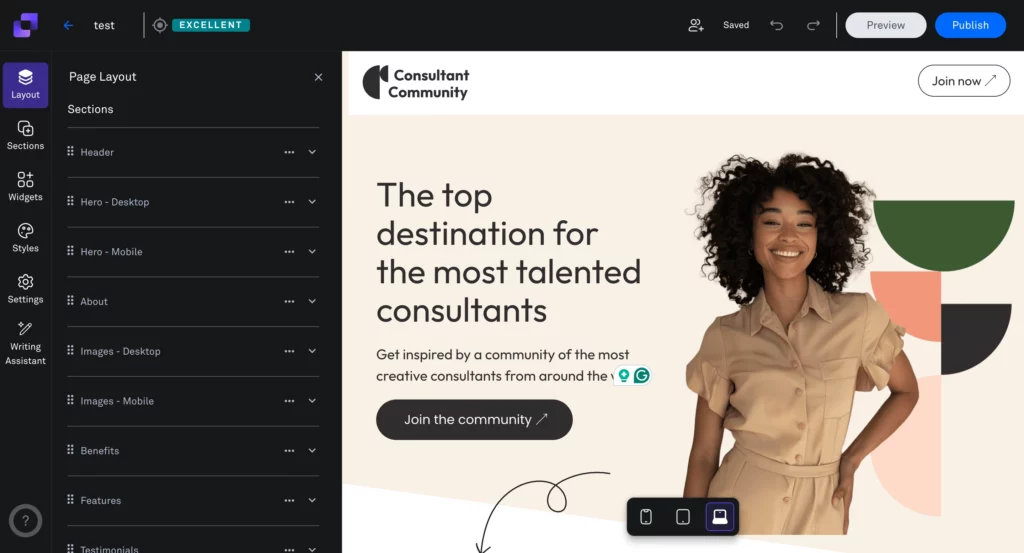
They can also set up their brand’s fonts and colors once. These settings will apply to all their pages, keeping them looking the same. While the builder lets users make basic changes, they can only place elements in predefined sections.
While the builder covers basic customization needs, it restricts element placement to predefined sections. Users looking to create unique layouts or make significant design changes often find these limitations frustrating.
Testing Leadpages: Building a Landing Page
To understand how Leadpages works in practice, we created a simple test landing page using the platform’s Page Studio builder.
The builder works around pre-designed sections that can be inserted into the page and then customized inside the visual editor. Users can modify headlines, images, forms, and other elements directly on the canvas rather than designing the layout entirely from scratch.
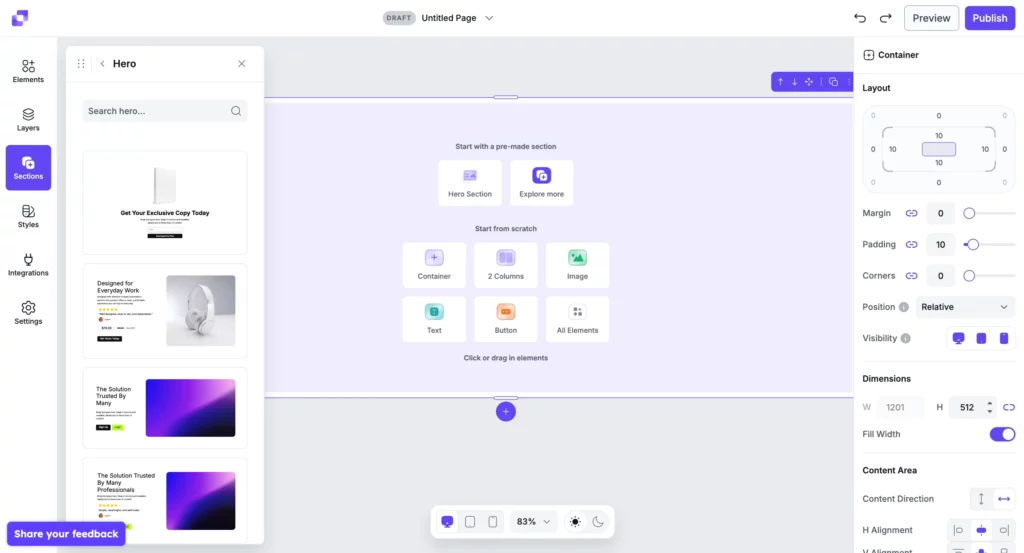
In our test, we built a simple weight loss lead generation page using a hero section, headline, supporting text, and an opt-in form. The editor makes it easy to rearrange sections and modify content, which is helpful for beginners who want to launch a page quickly.
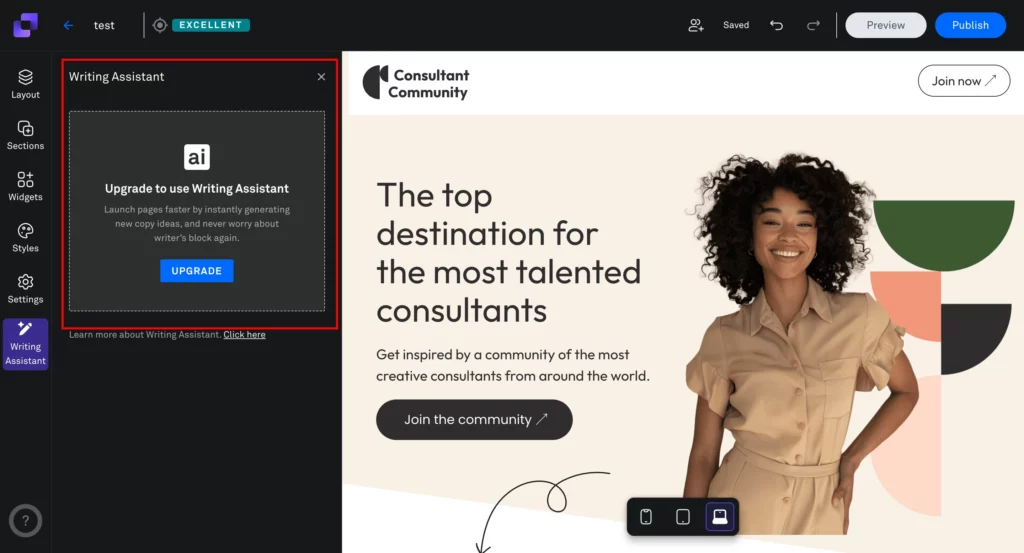
However, the process is still entirely manual. Users must select sections, insert elements, upload images, and write copy themselves. While Leadpages advertises AI capabilities, these tools are limited to content assistance rather than generating complete landing pages automatically.
During testing we also encountered a few limitations:
- AI writing assistant required an upgrade to access
- Everything has to be done manually
This means that while Leadpages can be effective for simple campaigns, marketers who need faster page creation, deeper optimization tools, or built-in automation may find the workflow somewhat restrictive.
Conversion, Testing, and AI Tools
Leadpages includes several built-in tools designed to help marketers capture leads and optimize landing pages.
Users can create pop-ups and alert bars to promote offers or collect leads. These can be triggered by actions like exit intent, time on page, or scroll behavior. While easy to set up, pop-ups can sometimes display awkwardly on smaller mobile screens.
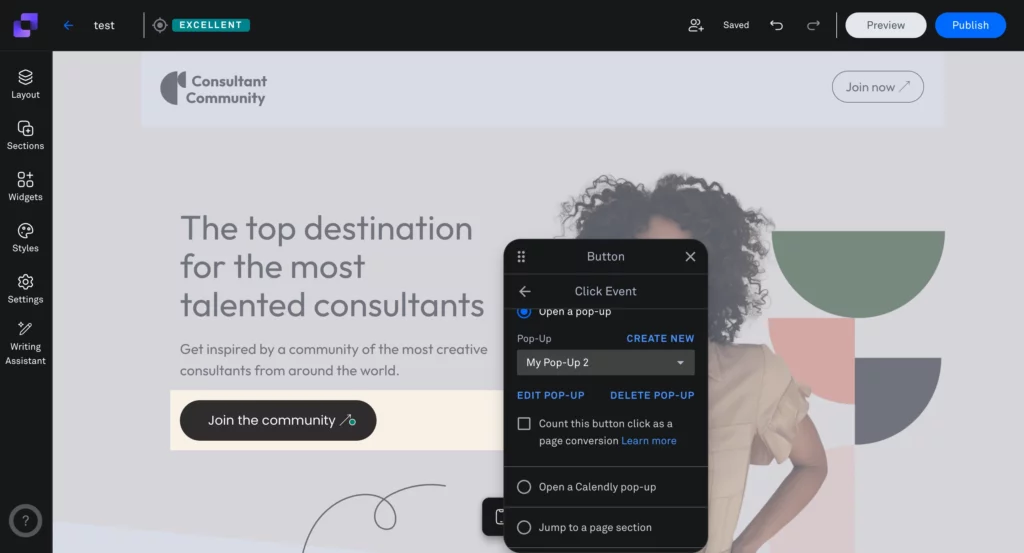
For optimization, Leadpages offers A/B testing, allowing users to compare different page versions and track metrics like visits and conversion rates. However, this feature is available only on the Pro and Conversion plans, limiting testing for users on the Standard plan.
Leadpages also provides AI-assisted content tools for generating headlines, text, and images. These tools help speed up content creation but do not generate full landing pages, meaning users still need to build page layouts manually using templates and the drag-and-drop editor.
Leadpages Plans and Pricing
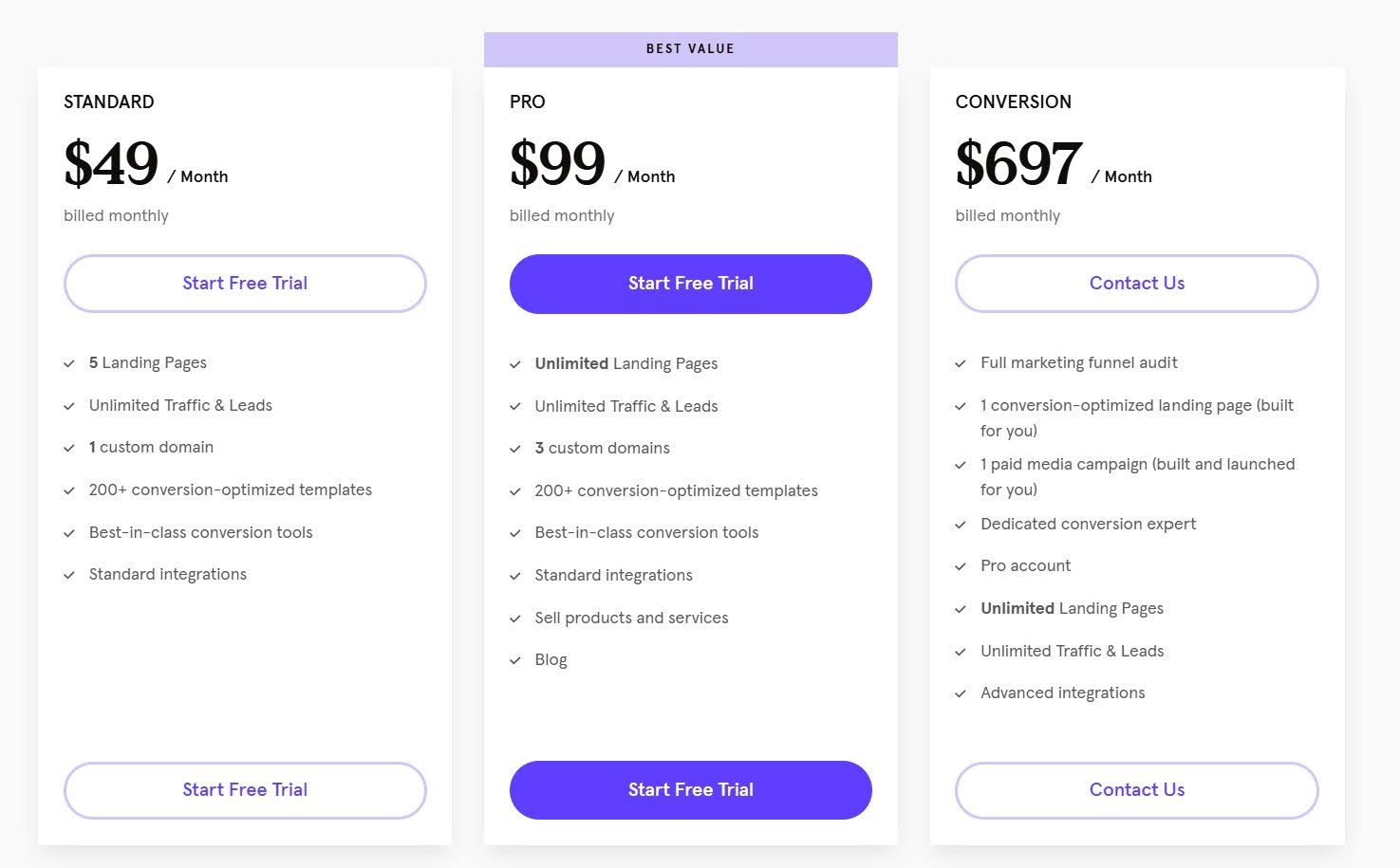
Leadpages offers three pricing plans tailored to different business needs and budgets.
The entry-level Standard plan, at $49 per month (or $37 per month when billed annually), provides a foundation for those just starting with landing pages.
This plan includes 5 landing pages, unlimited traffic and leads, 1 custom domain, access to over 200 templates, 40+ standard integrations, basic AI content tools (with 10,000 credits), email support, basic lead notifications, and a free domain for 1 year.
For businesses ready to scale their efforts, the Pro plan at $99 per month (or $74 per month paid annually) offers unlimited landing pages and traffic. It expands the custom domain allowance to 3 and includes all features from the Standard plan.
Additionally, Pro users gain access to A/B testing capabilities, online sales and payment tools, a blog platform, advanced integrations, chat and email support, and an increased allocation of AI credits to 30,000.
At the top tier, the Conversion plan, priced at $697 per month, is designed for established businesses seeking a comprehensive marketing solution. In addition to unlimited landing pages, traffic, and leads, this plan includes a custom domain and all Pro-tier features.
Conversion plan subscribers also benefit from a dedicated success coach, a full marketing funnel audit, priority support with video calls, and unlimited AI credits.
Team members can be added to any plan for an additional $15 per user per month.
All Leadpages plans come with a 14-day free trial, allowing users to explore the platform’s capabilities before committing. However, it requires a credit card submission before being allowed in.
The company also offers a 7-day grace period after the trial for refund requests, although many users have reported issues with requesting a refund. This is based on reviews submitted to Trustpilot.
For most small businesses and marketers, the Pro plan strikes a balance between functionality and cost. When evaluating Leadpages pricing, it’s clear that the Standard plan’s limit of 5 landing pages may be too restrictive for growing businesses, while the Conversion plan’s price point could be prohibitive for small to medium-sized operations.
Best Leadpages Alternative: LanderLab
If Leadpages feels limiting in terms of customization, testing, or advanced marketing features, LanderLab is one of the strongest alternatives available today. The platform is built for marketers and agencies that need more flexibility, automation, and performance optimization tools than traditional landing page builders provide.
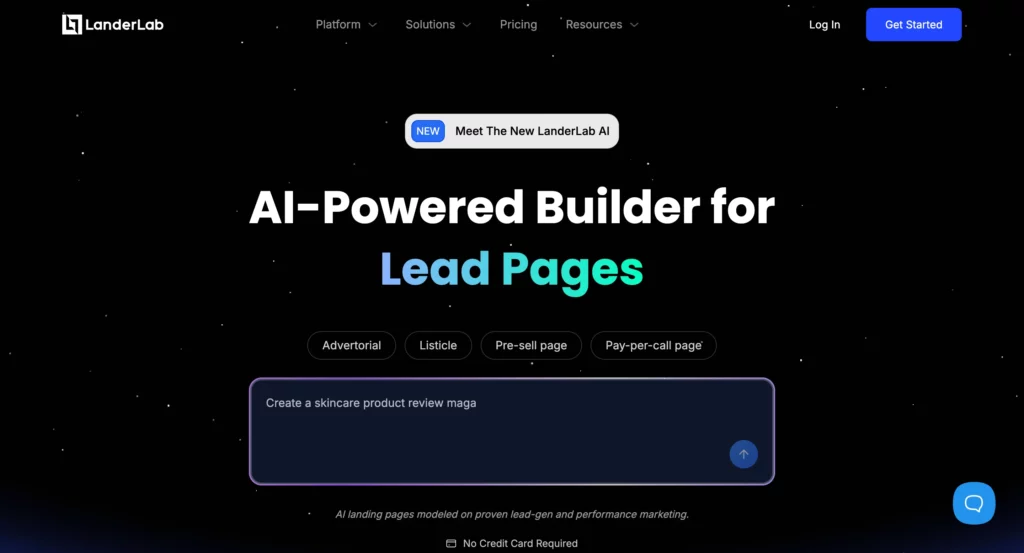
LanderLab combines a powerful drag-and-drop builder with AI-powered landing page creation, advanced A/B testing, quiz funnels with AI, and integrations with marketing and tracking tools.
What is LanderLab?
LanderLab is a cloud-based landing page platform designed to help marketers launch campaigns faster using AI-powered page creation and lead generation tools.
Instead of manually creating landing pages from templates, LanderLab allows users to generate complete landing pages with AI from a simple prompt. The AI creates the page structure, sections, and copy, which can then be customized using the visual drag-and-drop editor.
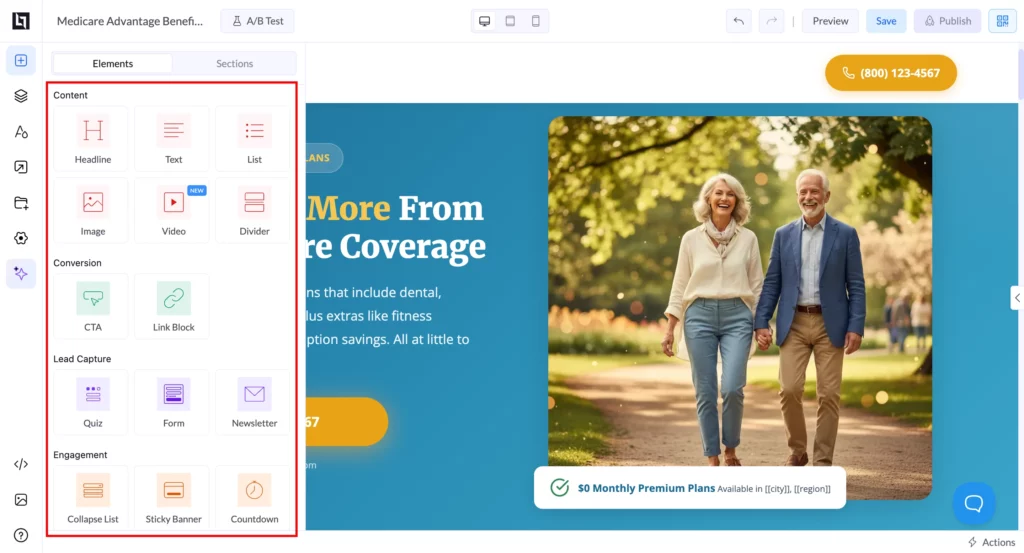
The AI also generates supporting visuals for the landing page. Images are automatically created to match the content and layout, helping users launch pages quickly without needing external design tools. These visuals can always be replaced or customized if needed.
One of the platform’s standout capabilities is its AI quiz funnel builder, which lets marketers generate multi-step lead qualification quizzes in seconds. These interactive funnels help capture leads, segment visitors based on their responses, and guide them toward personalized offers.
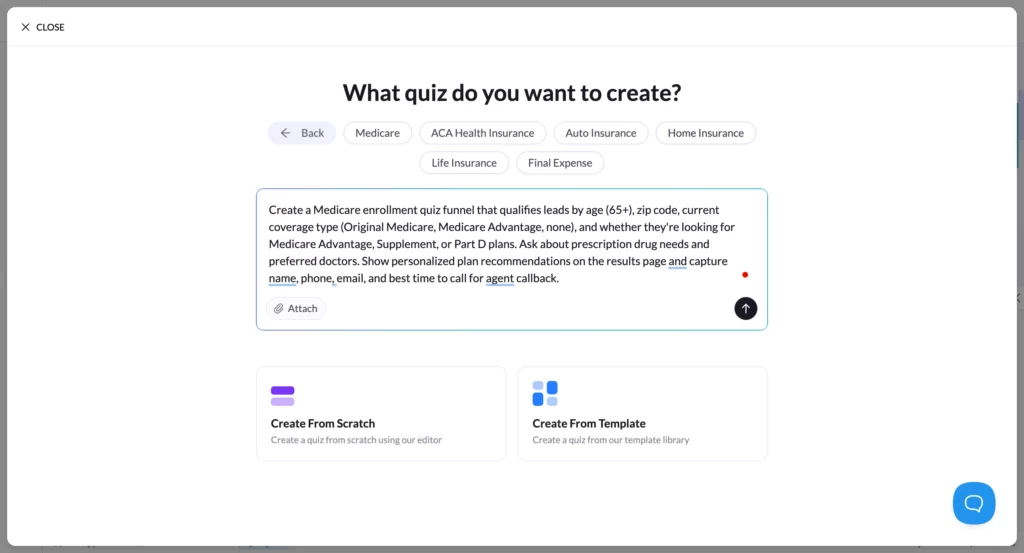
Combined with built-in A/B testing, lead management, and integrations with tracking platforms, LanderLab functions as more than a traditional page builder. It provides a streamlined environment for creating, testing, and optimizing lead generation campaigns.
Testing LanderLab: Creating a Landing Page with AI
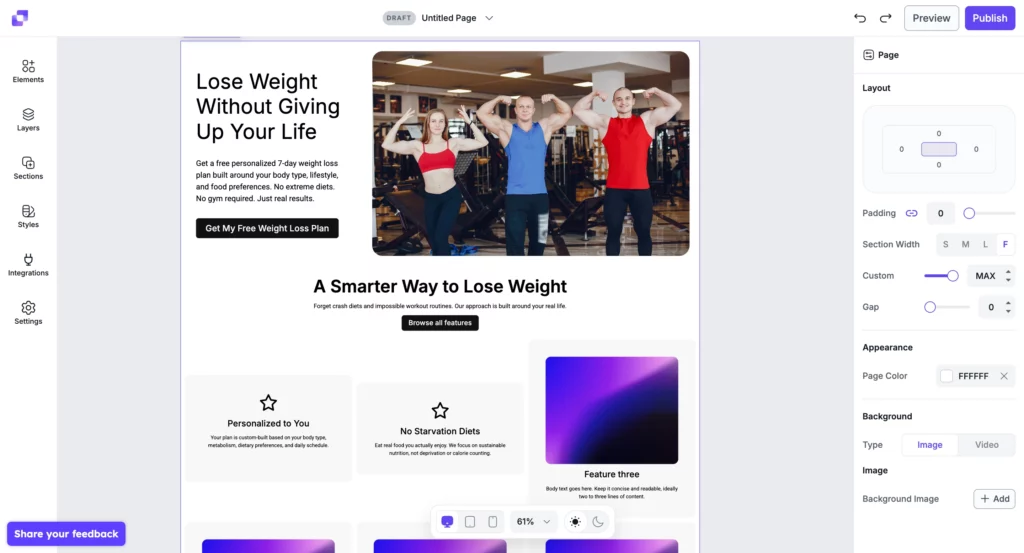
To test the platform, we created a simple weight loss lead generation landing page using LanderLab’s AI assistant.
After entering a short prompt describing the offer, the platform immediately began generating the page structure. The AI first created the images needed for the landing page and then assembled the full layout automatically.
As shown in the interface, the AI generated the hero section, headline, call-to-action buttons, and supporting content blocks without requiring manual setup.
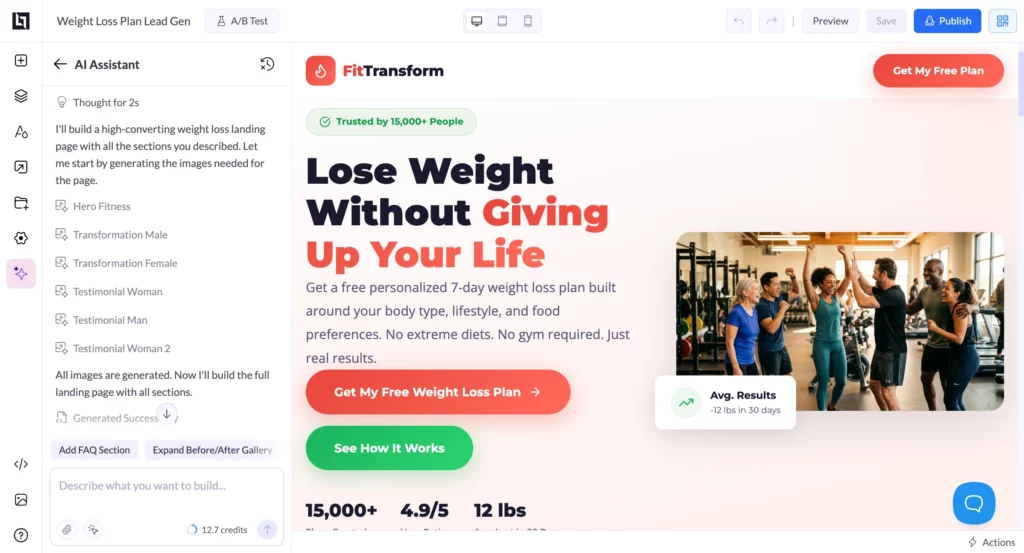
Once the page was generated, everything could be edited directly inside the visual builder. Headlines, images, and sections could be adjusted in seconds using the drag-and-drop editor.
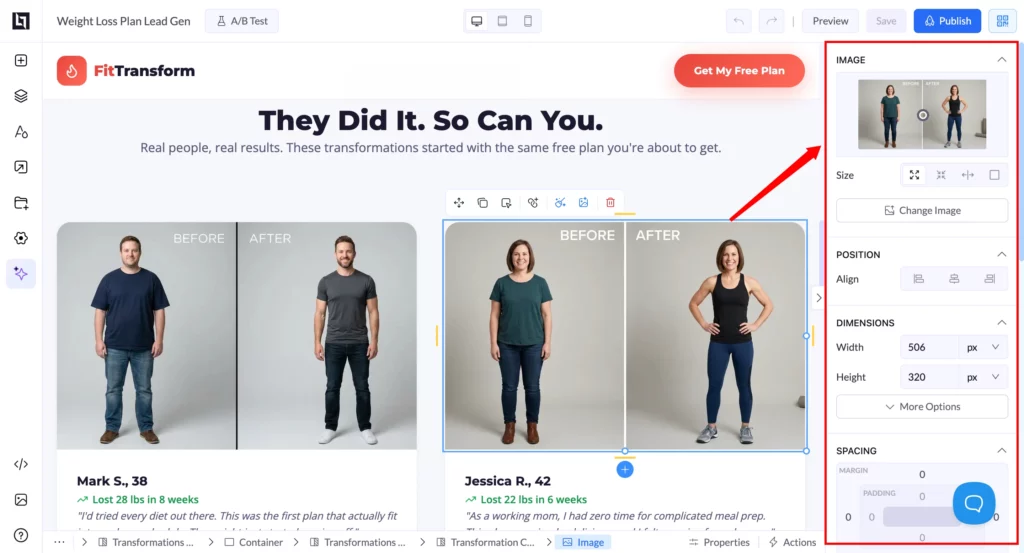
The entire process felt much faster than the typical template-based workflow used by many landing page builders.
Why People are Using LanderLab?
LanderLab is designed for marketers who need more control and flexibility than traditional landing page builders provide. Instead of relying only on templates, the platform focuses on helping teams launch campaigns quickly, test variations, and optimize performance.
One of the main reasons marketers choose LanderLab is its AI landing page builder, which can generate complete pages from a simple prompt and then allow users to customize them inside the visual editor. This dramatically reduces the time required to launch new campaigns.
Another major advantage is the AI quiz funnel builder, which allows users to create multi-step lead qualification funnels. These interactive quizzes can capture more detailed information from visitors and guide them toward personalized offers.
Other features that attract marketers include:
- A flexible drag-and-drop editor without strict layout limitations
- Advanced A/B testing with customizable traffic distribution
- Built-in lead management and filtering tools
- Integration with tracking platforms and competitive intelligence tools like Adplexity and Anstrex
Together, these capabilities make LanderLab especially useful for marketers running multiple campaigns who need faster testing, deeper insights, and more control over their landing pages.
“The APPLE of page builder – Outstanding support team as well
The last update made Landerlab THE most competitive tool I have ever used. Wether you are doing direct response campaigns or a simple website to showcase your b2b services, this tool is packed with templates, AI, and features that will save you a great deal of time.My main satisfaction comes from the team and outstanding support I am getting, on top of being on telegram which is very convenient, the team is very responsive and dedicated to make everything easy for me. They also imported all of my funnels from my previous tool.”
Xavier – Verified Trustpilot Review
What Makes LanderLab Different From Leadpages
During testing, several differences between Leadpages and LanderLab became clear.
The most noticeable one is how landing pages are created.
While Leadpages relies primarily on templates and manual editing, LanderLab allows marketers to generate complete landing pages using AI.
After entering a simple prompt, the platform creates the layout, sections, copy, and images automatically, which can then be refined using the visual editor.
Another major difference is lead qualification and analysis. LanderLab includes an AI quiz funnel builder that allows users to generate multi-step quizzes designed to capture and segment leads.
These funnels help gather more detailed information from visitors and guide them toward personalized offers.
Beyond capturing leads, LanderLab also provides AI Lead Insights, which analyze how leads respond to quiz questions or form submissions. This allows marketers to better understand their audience, identify patterns in responses, and refine their campaigns based on real lead behavior.
LanderLab also includes tools designed for campaign optimization and scaling, such as:
- advanced A/B testing with traffic distribution
- built-in lead management and filtering
- AI lead insights for analyzing responses and lead behavior
- landing page importing from URLs or ZIP files
- integrations with tracking platforms and spy tools like Adplexity and Anstrex
These capabilities make LanderLab particularly useful for marketers running multiple campaigns who need faster experimentation, deeper insights, and more control over their landing pages.
LanderLab Plans and Pricing
LanderLab offers straightforward pricing with three core plans designed to scale with your business needs. Each tier builds upon the previous one, adding more capabilities and higher usage limits.
Launch Plan ($89/month)
Perfect for getting started with landing page creation:
- 100,000 monthly visits
- 50 published landing pages
- 5 custom domains
- 3 Lead / Webhook Integrations
- 3 Workspaces
- $0.001/visit per month
- $5/domain per month
Core features include:
- Complete template library access
- Drag & Drop Builder
- Built-in code editor
- File management system
- Lead capture and management
- Analytics and conversion tracking
- Direct integrations
- 5,000 AI feature credits monthly
Grow Plan ($149/month)
Ideal for growing businesses and agencies:
- 500,000 monthly visits
- 125 published landing pages
- 15 custom domains
- 10 Lead / Webhook Integrations
- 10 Workspaces
- $0.0007/visit per month
- $5/domain per month
Additional features:
- URL import functionality
- A/B testing capabilities
- Advanced click tracking
- All Lite plan features
Scale Plan ($299/month)
Built for high-volume marketers:
- 2,000,000 monthly visits
- 350 published landing pages
- 50 custom domains
- 50 Lead / Webhook Integrations
- 25 Workspaces
- $0.0003/visit per month
- $5/domain per month
Enhanced capabilities:
- Landing page download option
- Priority support access
- All Growth plan features
Enterprise Plan ($799/month)
Designed for enterprise-level operations:
- 10,000,000 monthly visits
- 1000 published landing pages
- 125 custom domains
- 150 Lead / Webhook Integrations
- 100 Workspaces
- $0.0001/visit per month
- $5/domain per month
Premium features:
- Dedicated account manager
- Video call support
- Skype access
- All Master plan features
Each plan includes:
- SSL certificates
- CDN hosting
- Unlimited conversions
- Basic email support
- Access to integrations
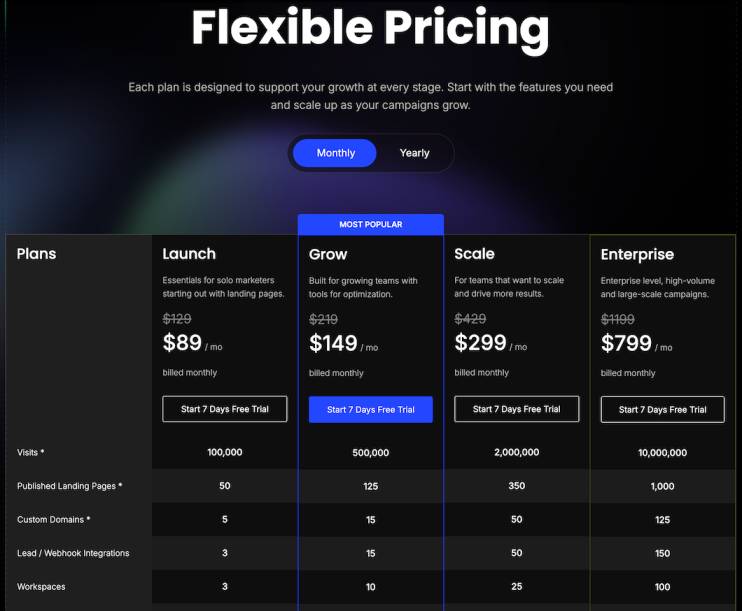
All plans include essential features like unlimited leads, robust analytics, and access to the template library. Higher-tier plans unlock advanced features while significantly increasing traffic allowance. Plus, LanderLab’s overage pricing ensures you only pay for the extra traffic you actually use, making it a cost-effective solution as your campaigns scale.
Additional domains can be added to any plan for $5 per domain per month, providing flexibility for growing campaigns.
Compared to Leadpages’ restrictive limit of 5 landing pages on their Standard plan, LanderLab’s entry-level Launch plan offers 50 published pages, making it a more practical choice for businesses running multiple campaigns.
Don’t forget, all these plans have a risk-free 7-day free trial so you can evaluate the platform extensively.
Why is LanderLab the Best Leadpages Alternative?
Leadpages works well for simple landing pages, but it becomes limiting as campaigns grow. Features like A/B testing restrictions, manual page creation, and limited lead analysis can slow down marketing workflows.
LanderLab takes a more modern approach by combining AI landing page generation, quiz funnels, and AI lead insights with advanced testing and campaign management tools.
For marketers who need to launch pages faster, experiment with multiple variations, and better understand their leads, LanderLab provides a more flexible and scalable solution.
Try LanderLab free for 7 days and start building your next campaign.
Tired of hitting walls with Leadpages?
Move to LanderLab, the Leadpages alternative that gives you full design freedom, built-in testing tools, and seamless integrations. No bloat. Just results.
FAQs
Can I migrate my Leadpages landing pages to LanderLab?
Yes. LanderLab offers multiple import options. You can import pages via URL (if your landing pages in Leadpages are still live), upload them as ZIP files (if you were able to download your landing pages from Leadpages), or use the technical support service to help migrate your existing pages.
Is LanderLab cheaper than Leadpages?
Leadpages’ cheapest plan is worth $49 per month but allows only 5 active landing pages. LanderLab’s cheapest plan is $69 per month but allows twice as many landing pages (10 active pages). If you compare based on the value, LanderLab is certainly cheaper.
Does LanderLab work with my existing tools?
LanderLab offers several integrations, including major email marketing platforms, CRMs, and analytics tools. If you’re using common marketing tools, they’ll likely integrate directly or through Zapier. You can also use custom webhooks for leads collection.
What happens to my custom domain?
You can easily connect your existing domain to LanderLab. The platform includes built-in Cloudflare integration for faster setup and better performance.
Is LanderLab’s page builder easier to use than Leadpages?
Yes. LanderLab’s drag-and-drop builder is just as intuitive as Leadpages’, and offers more customization options. If you’re comfortable with Leadpages, you’ll find LanderLab familiar and more flexible.
Can I try LanderLab before fully switching?
Yes. LanderLab offers a free trial period where you can test all features. You can build your first pages in LanderLab while keeping your Leadpages account active to ensure a smooth transition.
What about page loading speed?
LanderLab uses Cloudflare’s global CDN, ensuring your pages load quickly worldwide. Performance typically matches or exceeds Leadpages, with a 99.9% uptime guarantee.
Will I need to learn new technical skills when using LanderLab?
No. While LanderLab offers more advanced features, they’re optional. You can start with the basic drag-and-drop builder and explore additional capabilities as needed.

![Best Unbounce Alternatives for High-Converting Pages [2026]](https://wp.landerlab.io/wp-content/uploads/2025/05/Best-Unbounce-Alternatives-to-Build-Landing-Pages-2026.webp "Best Unbounce Alternatives for High-Converting Pages [2026]")
